Minimum requirements
Everything you need to install and begin using Halo as a Single Node (virtual appliance).
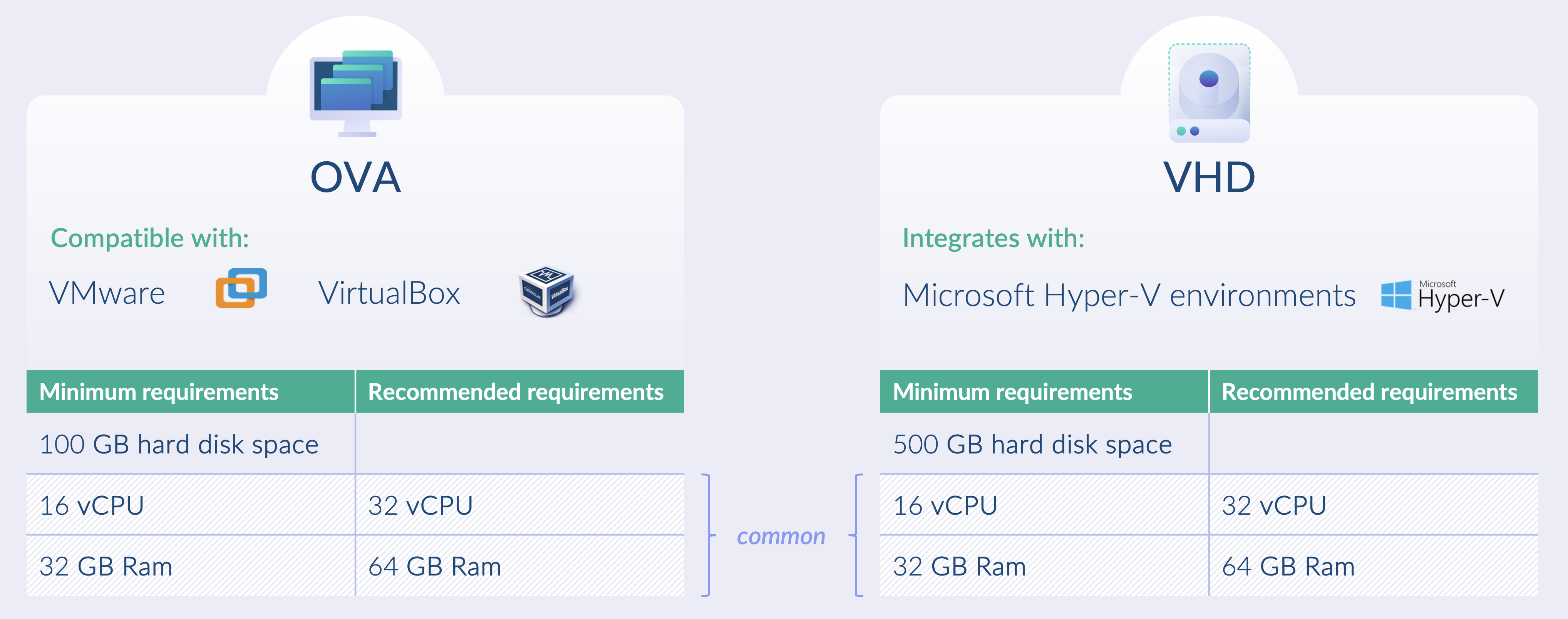
System requirements
Single node virtual appliances can be deployed as OVAs, compatible with VMware and VirtualBox, or as VHDs, compatible with Microsoft Hyper V.
Minimum footprint
- CPU: 1 GHz or faster with 16 or more virtual cores using an x86 64 architecture
- Memory: 32 GB RAM recommended
- Storage: 100 GB disk space for OVA or 500 GB disk space for VHD
- Usage guidance: Halo with the ICAP server enabled is recommended only for light to moderate traffic volumes
Comfortable footprint
- CPU: 1 GHz or faster with 32 or more virtual cores using an x86 64 architecture
- Memory: 64 GB RAM recommended
- Storage: 200 GB disk space for OVA or 500 GB disk space for VHD
- Usage guidance: This footprint is recommended when the ICAP server is enabled, particularly for protecting users browsing external networks or for workloads with variable demand
With Foresight enabled
To run Foresight (AI-powered threat prediction), the appliance requires at least 24 CPU cores and 48 GB RAM.
Supported hypervisors
The appliance is distributed in several image formats. Choose the format that matches your hypervisor:
| Hypervisor | Image format | Minimum version | Deployment guide |
|---|---|---|---|
| VMware ESXi | OVA | ESXi 7.0.0 or later | VMware deployment |
| VirtualBox | OVA | 7.0.8 or later | VMware deployment (OVA import) |
| Microsoft Hyper-V | VHD | Windows Server 2019 / Windows 10 or later | Hyper-V deployment |
| Proxmox VE (KVM-based) | qcow2 | — | Proxmox deployment |
The OVA, VHD and qcow2 images are available in Kiteworks.
KVM-based hypervisors (including RHEL KVM)
A native qcow2 image is provided for KVM-based platforms. qcow2 installs directly on KVM with no conversion:
- For Proxmox VE (which is KVM-based), use the qcow2 image and follow the Proxmox deployment guide.
- For libvirt / QEMU-KVM (for example, KVM on RHEL), attach the qcow2 image to a new VM that meets the requirements above. If you need a different image format or assistance with a specific KVM platform, contact Glasswall Support.
Disk layout and provisioning
The appliance image ships with a fixed virtual disk size (see Storage above). When deploying, keep the following in mind:
- Thin vs thick provisioning is chosen at import, not baked into the image. Most hypervisors let you select the provisioning mode when you deploy the OVA/VHD. In VMware, for example, choose Thin Provision on the Select storage step of Deploy OVF Template if you want the disk to consume space on demand rather than allocating it all up front.
- Provision enough disk before first boot. The simplest way to run with more capacity is to deploy onto a larger disk from the start, sized for your expected throughput and retention.
- Extending an existing appliance's disk requires both growing the virtual disk at the hypervisor and extending the partition/filesystem inside the guest, which depends on the appliance's partition layout. If you need to resize an already-deployed appliance, contact Glasswall Support for the supported procedure rather than repartitioning manually.
Scaling
Vertical scaling (scaling up)
Halo can use additional virtual CPU cores and memory to support increased demand on the virtual appliance.
- Adding resources: Vertical scaling involves increasing the resources of a single virtual appliance, such as adding CPU cores, memory, or storage.
- Single instance focus: The workload is handled by a single, more powerful appliance rather than being distributed across multiple instances.
- Simpler management: Managing one scaled up appliance is typically simpler, as there is no requirement for load balancing or state management across multiple nodes.
- Hardware constraints: Vertical scaling is limited by the maximum CPU, memory, and storage supported by the underlying hardware or virtual environment.
- Reduced fault tolerance: Vertical scaling does not inherently provide redundancy. If the appliance fails, there is no automatic failover unless a backup or high availability solution is in place.
Horizontal scaling (scaling out)
- Adding instances: Horizontal scaling increases capacity by deploying additional virtual appliances rather than increasing the size of a single instance.
- Load distribution: A load balancer is typically used to distribute traffic evenly across appliances, preventing any single appliance from becoming a bottleneck.
- Fault tolerance and redundancy: If one appliance fails, others can continue to handle traffic, improving availability and resilience.
Limitations: While horizontal scaling is supported, each virtual appliance maintains its own database. Appliances operate independently, and content management policies and configuration settings cannot be managed centrally.
Licensing: Licences must not be shared between virtual appliances. A separate licence is required for each virtual appliance.
Image base OS
- STIG hardened RHEL v9.4 (Sep 2024)
Orchestration layer
- RKE2 v1.28.10~rke2r1 (Sep 2024)