Minimum requirements
Everything you need to install and begin using Halo as a Single Node (virtual appliance).
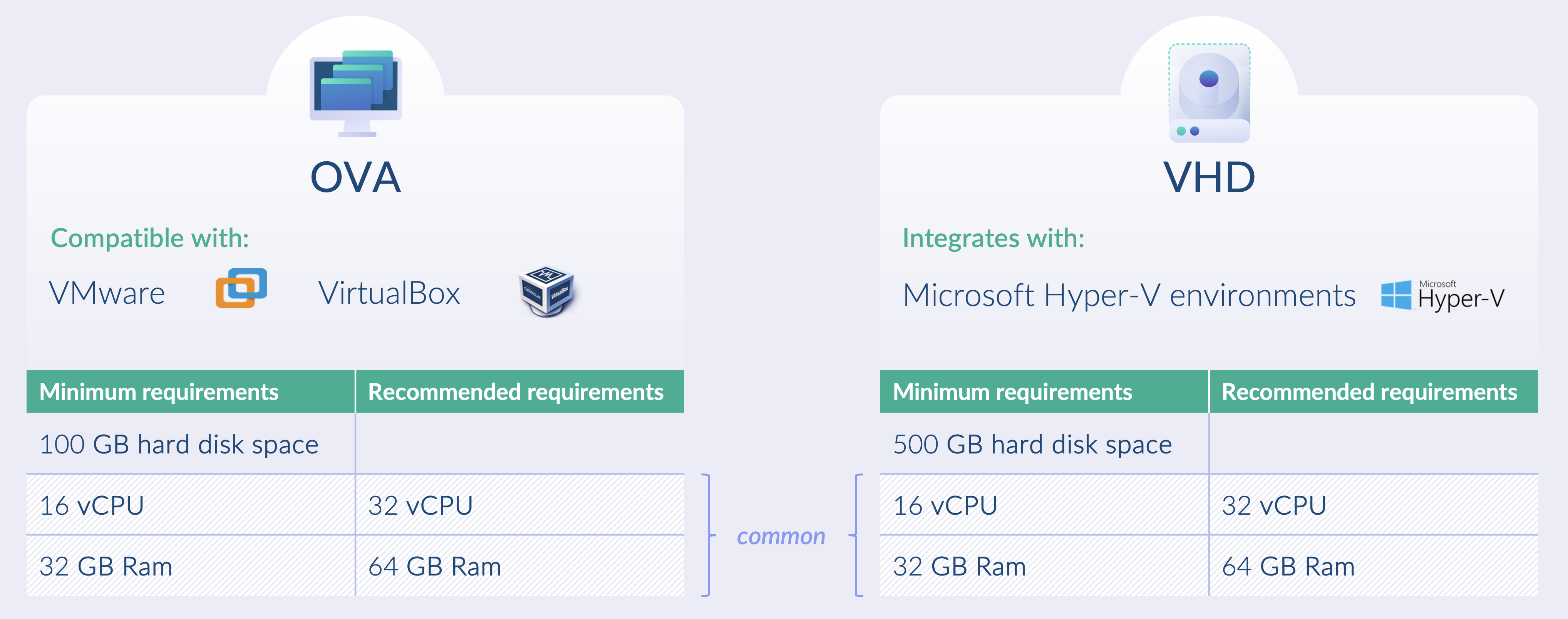
System requirements
Single node virtual appliances can be deployed as OVAs, compatible with VMware and VirtualBox, or as VHDs, compatible with Microsoft Hyper V.
Minimum footprint
- CPU: 1 GHz or faster with 16 or more virtual cores using an x86 64 architecture
- Memory: 32 GB RAM recommended
- Storage: 100 GB disk space for OVA or 500 GB disk space for VHD
- Usage guidance: Halo with the ICAP server enabled is recommended only for light to moderate traffic volumes
Comfortable footprint
- CPU: 1 GHz or faster with 32 or more virtual cores using an x86 64 architecture
- Memory: 64 GB RAM recommended
- Storage: 200 GB disk space for OVA or 500 GB disk space for VHD
- Usage guidance: This footprint is recommended when the ICAP server is enabled, particularly for protecting users browsing external networks or for workloads with variable demand
Supported hypervisors
- Microsoft Hyper V: Hyper V on Windows Server 2019 or later and Windows 10 or later
- VMware: VMware ESXi 7.0.0 or later
- VirtualBox: Version 7.0.8 or later
Scaling
Vertical scaling (scaling up)
Halo can use additional virtual CPU cores and memory to support increased demand on the virtual appliance.
- Adding resources: Vertical scaling involves increasing the resources of a single virtual appliance, such as adding CPU cores, memory, or storage.
- Single instance focus: The workload is handled by a single, more powerful appliance rather than being distributed across multiple instances.
- Simpler management: Managing one scaled up appliance is typically simpler, as there is no requirement for load balancing or state management across multiple nodes.
- Hardware constraints: Vertical scaling is limited by the maximum CPU, memory, and storage supported by the underlying hardware or virtual environment.
- Reduced fault tolerance: Vertical scaling does not inherently provide redundancy. If the appliance fails, there is no automatic failover unless a backup or high availability solution is in place.
Horizontal scaling (scaling out)
- Adding instances: Horizontal scaling increases capacity by deploying additional virtual appliances rather than increasing the size of a single instance.
- Load distribution: A load balancer is typically used to distribute traffic evenly across appliances, preventing any single appliance from becoming a bottleneck.
- Fault tolerance and redundancy: If one appliance fails, others can continue to handle traffic, improving availability and resilience.
Limitations: While horizontal scaling is supported, each virtual appliance maintains its own database. Appliances operate independently, and content management policies and configuration settings cannot be managed centrally.
Licensing: Licences must not be shared between virtual appliances. A separate licence is required for each virtual appliance.
Image base OS
- STIG hardened RHEL v9.4 (Sep 2024)
Orchestration layer
- RKE2 v1.28.10~rke2r1 (Sep 2024)